Multiplexer users (*) for macOS must install an FTDI driver to connect them to their device via USB. With macOS 26.x a new driver is essential version 1.6.0. It is compatible with Intel 64-bit and ARM processors, and macOS systems 11/12 and 15. Installation requires a little attention, because the macOS system 26 must allow its installation, the path is not easy to find, follow the guide…
Delete the old installer from the /Applications/ folder, then drag the new one into it. Launch the installer from the /Applications/ folder, it starts as expected. Then click on the “Install FTDI USB” button… ”, a new window opens :
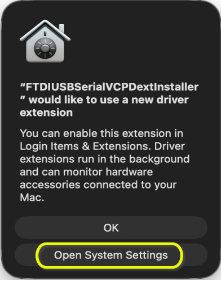
- Click “Open System Settings”
- Go to > General > Opening and extensions
- Go down to : " Extensions ” > tab " By category ”
- To the right of “ Manager Extensions " , click the ⓘ button :

It opens this window, simply activate the selector in front of the driver and the installation is ready :
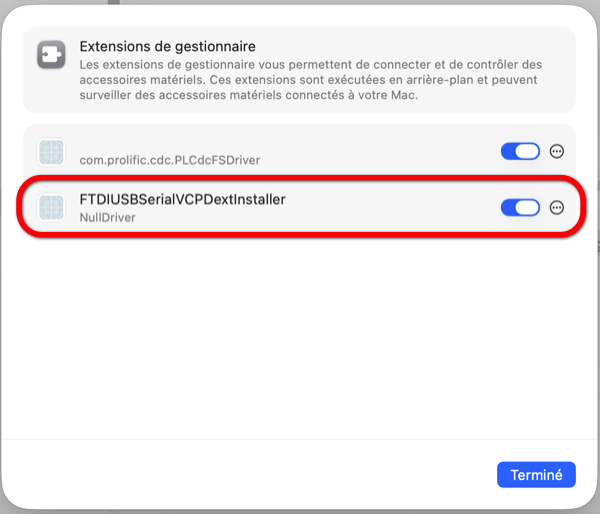
Warning : never delete the installation file from the /Applications folder.
–––
(*) MiniPlex-2 and -3, Actisense, Eat, aso…
–––
What do you mean by multiplexer? ? Does navilink 2 is concerned by this manipulation ?
The Digital Yacht NavLink2 does not have a USB connector, it is therefore not affected by this driver.